Manifest Maker+ creates a simple ADL SCORM Course Manifest, based on the IMS Course Packaging Manifest as described in the version 1.1 specification published in May 2001. The resulting XML file should be compatible with IMS Global Consortium, ADL SCORM specifications. The manifest is created based on the structure of your site. To define a site, use the Dreamweaver Site menu and select Define Sites....
The manifest is saved in the root level directory of the site as: imsmanifest.xml. You will need to re-run Manifest Maker+ if you add or remove files or references. If you run Manifest Maker+ on a site with an existing manifest, it will provide the previous title, description and keywords for you to edit. See the Manifest Maker+ Dialog Controls below for more information on changing the generated manifest information. The resulting packaging manfests have been validated against ADL test suites and sucesssfuly imported by several major LMS products that support SCORM 1.1.
Note that in many cases, some manual editing of the manifest will be needed to reflect your preferred organizational intent because of the Manifest Maker+ Assumptions described below.
For more information on the IMS and Course Packaging Manifest, seen the Course Packaging Specification at: http://www.imsproject.org/
Check for the latest version
of Manifest Maker extension at:
http://exchange.macromedia.com or http://www.macromedia.com/learning
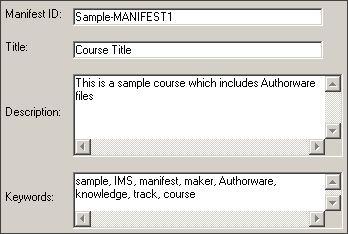
Use these fields to provide information for the corresponding manifest XML elements.
Manifest ID
(Identifier) will default to sitename-MANIFEST1 where
sitename is the site name you provided when you defined your site in
Dreamweaver. Manifest
ID may be changed, but it must not be blank and must not contain
spaces.
Title is the name of your course which will default to sitename, but may be changed.
Description and Keywords are empty by default. Enter the appropriate values for your course or leave these fields empty.
Only the selected HTML documents in the Table of Contents tree control will be added to the manifest as Table of Contents items. However, all HTML files will be included as resources. By default, Manifest Maker will select all HTML files to be included as Table of Contents items.

Use shift-click or control-click to manage multiple selections so that only the desired items are selected. In the example above, two HTML documents have been de-selected so that only the remaining selection (knowledgetrack-new.htm) will be included in the Table of Contents.
The XML Document Controls allow you to copy XML support files to your local site root.
| Copy XSD files to site |